


Nonprofit Chart of Accounts: How to Get Started + Example
Tuesday, February 3, 2026 by Jon Osterburg
The core of nonprofit accounting is accountability. Financial transparency and organization are especially important to your nonprofit's success, and there are a variety of reports and systems you can leverage to keep your nonprofit's financial information in order. The most foundational of these tools is a chart of accounts (COA).
Although it forms the backbone of your organization's accounting system, your COA can be a challenging resource to understand, create, and maintain. Fortunately, the experts at Jitasa are here to help! In this guide, we'll cover the basics of the nonprofit chart of accounts, including:
- Nonprofit Chart of Accounts FAQ
- Chart of Accounts Applications for Nonprofits
- Nonprofit Chart of Accounts Template & Example
- Tips for Maintaining Your Chart of Accounts
Let's begin with an overview of what your nonprofit's COA is and how it's structured.

Partner with Jitasa's financial experts to set up and maintain your chart of accounts.
Request a QuoteNonprofit Chart of Accounts: Frequently Asked Questions
What is a nonprofit chart of accounts?
A nonprofit chart of accounts is a table-style list of all of your organization's financial accounts. It functions as a directory of your records, making it the cornerstone of all accounting procedures at your nonprofit.
Think of your nonprofit's COA like an extensive filing cabinet. It organizes all of your financial recordkeeping categories into a list format, helping you find information about everything from bank deposits to investment growth to payroll records.
What information is included on a nonprofit chart of accounts?
Most nonprofit COAs are divided into the following five categories:

- Assets: This section lists what your nonprofit owns, such as cash, property, and accounts receivable.
- Liabilities: This category encompasses everything your organization owes, including accounts payable, deferred revenue, and debt.
- Net Assets: This equals the value of your assets minus your liabilities, which indicates how much your nonprofit is worth.
- Revenue: This category includes all of the funding your organization brings in through individual donations, corporate philanthropy, grants, and other income sources.
- Expenses: This section outlines all of your nonprofit's expenditures on mission-critical programs, fundraising campaign planning and execution, and administrative needs like utility bills and staff compensation.
Although most organizations use this basic structure, you should tailor your COA to your nonprofit's unique financial situation and needs so it can serve as an effective directory for your team.
What is the Universal Chart of Accounts for nonprofits?
The Unified Chart of Accounts (UCOA) is a standardized nonprofit chart of accounts that aligns with the reporting requirements on IRS Form 990. This resource is where the five sections above come from, which is why organizing your COA based on those categories is useful for compliance purposes.
However, for small to mid-sized organizations, modeling your chart of accounts after the highly detailed UCOA is comparable to killing a mosquito with a sledgehammer. It's much more efficient to follow other examples and templates available online as you customize your chart to include only the accounts your nonprofit actually needs (more on this later!).
Chart of Accounts Applications for Nonprofits
Your nonprofit's chart of accounts forms the foundation for all of your organization's reports that summarize your financial data, so it's easier to analyze and apply. The most notable of these are the four core nonprofit financial statements, which include your:
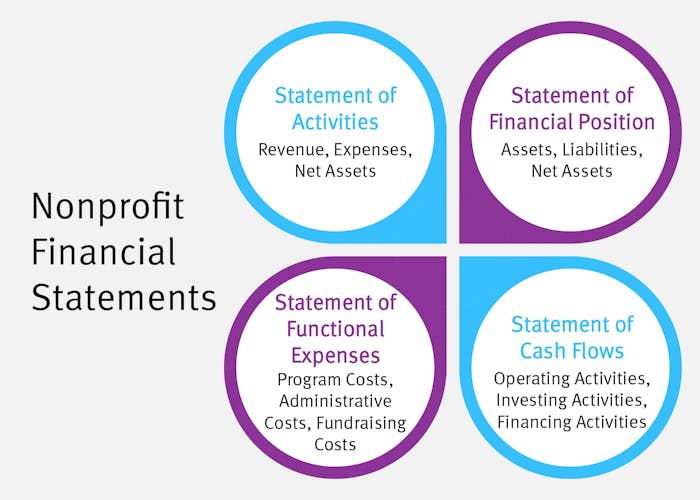
- Statement of activities: The nonprofit parallel to the for-profit income statement, this report outlines your organization's revenue, expenses, and net assets to assist in the budgeting process.
- Statement of financial position: Also called a balance sheet, this statement breaks down your assets, liabilities, and net assets to help you assess your organization's financial health and plan for growth.
- Statement of cash flows: This report shows how cash moves into and out of your nonprofit through operating, investing, and financing activities to keep you on track with spending and fundraising throughout the year.
- Statement of functional expenses: This statement divides your organization's expenses into the categories of program, administrative, and fundraising costs to show how your funding is being used to further your mission.
All of these reports provide essential information for completing your nonprofit's annual tax return. As you look back at your original financial records to prepare these reports, your chart of accounts can help you find the information you need—as long as you know where to find it.
Additionally, your COA will play an important role if your nonprofit undergoes a financial audit. A third-party auditor will use your chart of accounts to navigate through the various financial records they plan to examine. They'll also want to see the resource to make sure you keep your information organized in the first place.
CHEAT SHEET: COA & Nonprofit Financial Statements
Click on the name of one of the nonprofit financial statements below to see which categories from your COA you should reference while creating it.
Pro Tip: The nonprofit accountants at Jitasa can help you create your organization's COA and all of these financial statements!
Request a QuoteNonprofit Chart of Accounts Template & Example
To begin creating your nonprofit's chart of accounts, we recommend starting with the UCOA to assign numbers to your organization's accounts. While you can create from scratch rather than using the UCOA, paring down this guide tends to leave more room for growth and flexibility in the future.
Here is a breakdown of some of the major accounts that your nonprofit's COA might include, organized under the five categories mentioned earlier. Remember that your organization might not need to use all of these numbers at all times—just include the accounts that are relevant to your current financial activities as you create your COA, either from scratch or using one of the many templates available online.
Track your nonprofit's finances with our customizable chart of accounts template.
Download for FreeAssets (account numbers beginning with 1000)
- 1100 - Checking
- 1200 - Savings
- 1300 - Investments
- 1400 - Accounts Receivable
- 1410 - Grants Receivable
- 1420 - Pledges Receivable
- 1500 - Property
- 1600 - Equipment
- 1700 - Petty Cash
- 1800 - Notes/Loans Receivable
Liabilities (account numbers beginning with 2000)
- 2100 - Accounts Payable
- 2200 - Accrued Salaries
- 2300 - Accrued Employee Benefits
- 2400 - Accrued Payroll Taxes
- 2500 - Accrued Property Taxes
- 2600 - Unearned/Deferred Revenue
- 2700 - Short-Term Notes & Loans Payable
- 2800 - Line of Credit
- 2900 - Government Owned Fixed Liabilities
Net Assets (account numbers beginning with 3000)
- 3100 - Unrestricted Net Assets
- 3200 - Temporarily Restricted Net Assets
- 3300 - Permanently Restricted Net Assets
Revenue (account numbers beginning with 4000-6000)
- 4100 - Individual Contributions
- 4200 - Corporate Contributions
- 4300 - Legacies and Bequests
- 4400 - Federal Grants
- 4500 - State Grants
- 4600 - Local Government Grants
- 4700 - Foundation Grants
- 4800 - In-Kind Contributions
- 5100 - Program Service Fees
- 5200 - Membership Dues
- 5300 - Investment Revenue
- 5400 - Event Sponsorships
- 5410 - Event Ticket Revenue
- 5420 - Event Auction
- 6100 - Net Assets Released From Restriction
- 6200 - Unrealized Gain
- 6300 - Miscellaneous Revenue
Expenses (account numbers beginning with 7000-9000)
- 7100 - Salaries and Payroll
- 7110 - Payroll Taxes
- 7120 - Health Insurance
- 7130 - Retirement Benefits
- 7200 - Depreciation Expense
- 7300 - Contract Services
- 8100 - Office Supplies
- 8200 - Rent
- 8210 - Utilities
- 8220 - Real Estate Taxes
- 8230 - Equipment Purchase and Maintenance
- 8300 - Travel
- 8400 - Fundraising Expenses
- 8500 - Marketing and Promotion
- 9100 - Fixed Asset Purchases
- 9200 - Payment to Affiliates
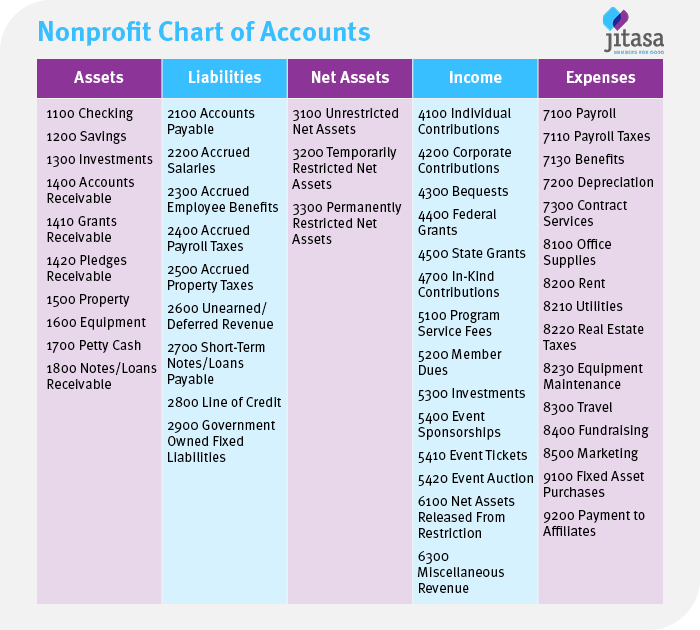
As you can see from these designations, it's helpful to assign numbers that are close together to similar accounts. That way, if you want to access multiple related types of financial data, you'll know exactly where to look.
For example, in the Expenses section, all personnel-related expense accounts have numbers that begin with 7000. Within that subcategory, expenses associated with salaried employees have account numbers that start with 7100, while other personnel expenses have the numbers 7200 and 7300. Later in that section, the accounts that pertain to facilities expenses—rent, utilities, real estate taxes, and equipment costs—all have numbers that start with 8200.
When you put all of this information together in a table format, your nonprofit chart of accounts should look something like this:
Tips for Maintaining Your Chart of Accounts
Developing a chart of accounts for your nonprofit isn't a one-and-done event. Your organization's financial situation and activities will change over time, and your COA needs to evolve in the same ways to ensure your financial data remains organized.
To effectively maintain your nonprofit's chart of accounts, try these tips:

- Keep your accounts as simple as possible. For instance, rather than having separate expense accounts for graphic design, website development, and paid advertising, you could group these into a more general account for marketing costs. Your COA should contain enough detail to accurately reflect your organization's financial activities, but not so much that it becomes overwhelming to navigate.
- Remove any unused accounts from your chart. In the vein of keeping your COA simple, delete any accounts that you haven't used recently and don't plan to use in the near future. For example, if your nonprofit hasn't secured any foundation grants in the past few years and you don't plan to apply for any this year, remove that account so you can focus on the other grant-related accounts you actively use. If you decide to pursue a foundation grant next year, you can always add that account back in when you need it.
- Allow room for growth. As your nonprofit expands, you'll likely need to add data to your COA. Make sure you can easily edit the chart and organize new accounts under their proper categories. Also, double-check that you don't have an existing account that an activity could logically fall under before adding a brand-new number to the COA.
- Leverage specialized accounting software. Although you might create your first chart of accounts in a spreadsheet, using an accounting platform like QuickBooks or Sage Intacct makes it easier to format and edit over time. Plus, you can view your COA, record transactions, and generate financial reports all in one place.
- Work with a nonprofit accountant. The best way to produce an accurate chart of accounts that is tailored to your organization's needs is to partner with an expert who can review your account numbering, suggest helpful revisions, and correctly set up your COA within your accounting system.
Because hiring an in-house accountant can be expensive and time-consuming, many nonprofits choose to outsource their accounting services to an external firm like Jitasa. By outsourcing, your organization gets access to all of the financial support you need in a more cost-effective manner than bringing on a new staff member. And because Jitasa specializes in working with nonprofits, our team's expertise is tailored to your specific needs and COA structure.
Understanding, developing, and maintaining an accurate nonprofit chart of accounts is essential for effective financial management at your organization. Use the strategies in this guide to get started, and don't hesitate to reach out to Jitasa's team of expert nonprofit financial professionals with any questions or concerns that come up as you leverage this foundational resource.
For more information about your COA's structure and applications, check out these resources:
- What Is Fund Accounting? A Guide to Basics & Best Practices. Explore the ins and outs of fund accounting, the system nonprofits use to track their finances for accountability.
- Nonprofit Financial Statements: 4 Essential Reports to Know. Learn more about the creation and purpose of the financial reports your COA most directly informs.
- Nonprofit Form 990 Filing: FAQ Guide + How to Get Started. Dive deeper into how to file your nonprofit's annual tax return and the role your COA plays in that process.